Updated for 2026: this version reflects the current Core Web Vitals set of LCP, INP, and CLS, the post-FID reality, and how performance affects prop firm funnels, trust, and conversion pages.
Core Web Vitals still matter in 2026, but not because they magically push weak content to page one. They matter because Google still uses them in page experience, and because faster, steadier pages convert better when your traffic is deciding whether to trust your brand, buy a challenge, or complete KYC.
If you run a prop firm, broker-adjacent site, or trading media brand, Core Web Vitals are not just a technical SEO task. They sit right in the middle of acquisition, trust, and revenue. That is also why this topic fits naturally beside broader work on prop firm SEO made simple: get ranked, get traders, get results and forex SEO strategy.
What are Core Web Vitals in 2026?
Core Web Vitals are Google’s three user-experience metrics for loading speed, responsiveness, and visual stability: Largest Contentful Paint, Interaction to Next Paint, and Cumulative Layout Shift.
Google’s current documentation says Core Web Vitals are part of what its ranking systems use when assessing page experience, but also makes it clear they are only one piece of the puzzle. Relevance still wins. Good performance helps most when several pages are otherwise similarly useful.
The three metrics are:
| Metric | What it measures | Good threshold |
|---|---|---|
| LCP | How fast the main content becomes visible | 2.5 seconds or less |
| INP | How fast the page responds to user interactions | 200 milliseconds or less |
| CLS | How much the layout shifts while loading | 0.1 or less |
Google documents these thresholds in both Search Central and the Search Console Core Web Vitals report.
Why do Core Web Vitals still matter for SEO?
Core Web Vitals still matter because Google uses them in ranking systems, but their bigger value is helping good pages avoid losing on experience when competitors are already close on content and links.
Google’s page experience documentation says there is no single page experience score and that strong Core Web Vitals do not guarantee top rankings. That matters because a lot of CWV advice still sells the fantasy that a green score equals ranking wins. It does not.
What it can do is remove drag.
If two pages are both relevant, both well-linked, and both credible, the page that loads cleanly, reacts quickly, and does not jump around gives Google and users fewer reasons to dislike it. That lines up with the logic behind intent-driven SEO vs keyword research: experience helps after intent match, not instead of it.
The wider web is still not great at this. The 2025 HTTP Archive Web Almanac found that only 48% of mobile sites and 56% of desktop sites achieved good overall Core Web Vitals in 2025. So this is not a solved problem. It is still a competitive gap, especially on mobile search.
Which Core Web Vital should you fix first?
You should fix the metric marked Poor first, then prioritize the pages that make money, generate leads, or protect trust.
Google’s own Search Console guidance is simple here: fix Poor URLs first, then work through issues affecting the most important pages or the most URLs. That is better advice than chasing Lighthouse vanity scores.
For most sites, the order looks like this:
- Fix any metric in the Poor range.
- Fix homepage, service, comparison, and high-traffic landing pages.
- Fix conversion pages such as contact, checkout, signup, demo, or account flows.
- Then move pages from Needs Improvement into Good.
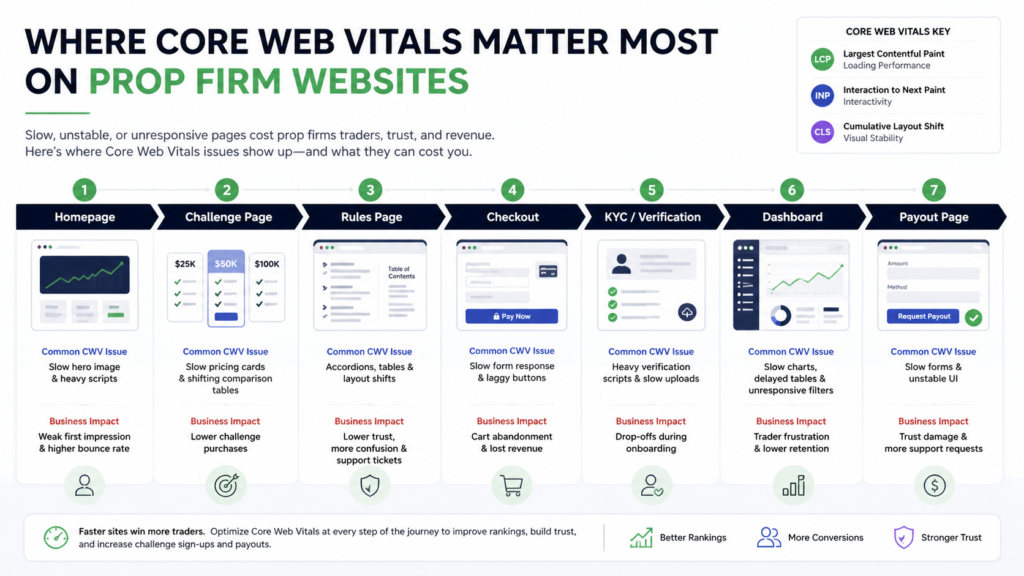
For prop firms, this is even more important because trust-sensitive pages do not get a second chance. If your evaluation checkout stalls, your rules page shifts while loading, or your trader dashboard feels slow after login, users do not read that as “minor front-end inefficiency.” They read it as risk. That same trust layer shows up in the wider conversion and acquisition issues behind prop firm marketing strategies.
How do you improve Largest Contentful Paint?
To improve LCP, make the main content load earlier by speeding up the server response, exposing the main asset quickly, and removing anything that delays the browser from discovering or rendering it.
Google’s guidance breaks LCP into parts: TTFB, resource load delay, resource load duration, and render delay. That framing is useful because “improve LCP” is too vague to act on.
Start here:
- Improve server response time.
Use caching, a CDN, and lighter templates. If the HTML arrives late, everything else starts late. - Identify the actual LCP element.
It is often a hero image, large heading block, or featured visual. Check it in PageSpeed Insights, Chrome DevTools, or WebPageTest. - Make the LCP asset discoverable in the initial HTML.
Google warns that LCP gets worse when the key image is injected by JavaScript, hidden behind CSS, or lazy-loaded by script. - Do not lazy-load the LCP image.
This is one of the most common self-inflicted mistakes. - Preload important assets when needed.
If your hero image, web font, or critical CSS is essential for the first screen, preload it carefully. - Reduce render-blocking bloat.
Heavy CSS, unnecessary third-party scripts, and bloated theme code often delay the first meaningful render.
For prop firm sites, LCP problems usually show up on pages with large hero sections, comparison tables, embedded Trustpilot widgets, pricing cards, and oversized chart images. The fix is usually less “buy a plugin” and more “stop loading junk before the main offer.” If that main offer sits on a commercial landing page, the broader acquisition context also connects back to prop firm SEO made simple: get ranked, get traders, get results.
How do you improve Interaction to Next Paint?
To improve INP, reduce main-thread work, trim JavaScript, and make key interactions respond immediately instead of waiting behind scripts, tracking tags, or UI clutter.
INP replaced FID as a Core Web Vital in March 2024, and a lot of older content is still writing for the old metric. That is one reason many older guides now feel dated.
INP matters more than many site owners realized because it measures the responsiveness of interactions across the page visit, not just the first input. The practical fixes are:
- Cut unnecessary JavaScript.
Remove scripts that are not helping search, conversion, or compliance. - Break up long tasks.
Large chunks of JavaScript block the browser and make clicks feel dead. - Delay non-critical third-party tools.
Chat widgets, heatmaps, review popups, and aggressive analytics are common culprits. - Prioritize fast responses on important UI.
Menus, tabs, filters, accordions, calculators, and forms should react instantly. - Test logged-in and post-load states.
INP often gets worse after the page loads, especially inside dashboards or account areas.
This is where prop firms should pay close attention. Evaluation filters, challenge calculators, account dashboards, payout request forms, KYC flows, and leaderboard widgets are all interaction-heavy. If those elements lag, you are not just hurting UX. You are damaging confidence at the exact moment people are deciding whether your operation looks serious. That same seriousness is part of how authority gets built around related topics such as entity SEO, where trust signals and topical clarity reinforce each other.
How do you improve Cumulative Layout Shift?
To improve CLS, reserve space for unstable elements before they load so the page does not move under the user.
Google lists the usual offenders clearly: images without dimensions, ads and embeds without reserved space, dynamically injected content, and web fonts.
The practical fixes are straightforward:
- Set width and height for images and video.
- Reserve space for embeds, tables, banners, and widgets.
- Avoid injecting content above existing content during load.
- Preload critical fonts and use sensible font-display behavior.
- Audit sticky bars, popups, review widgets, and cookie banners.
For prop firm websites, CLS often comes from review badges, broker or platform logos, countdown banners, promo strips, floating discount offers, and pricing modules that resize after script execution.
That matters more in this niche than people think. If a trader tries to click “Start Challenge” and the button shifts because a coupon banner appears, that is not just annoying. It makes the page feel cheap. In a niche already dealing with trust problems, cheap is not what you want to signal. That trust question also overlaps with the positioning behind why prop firm reviews matter for SEO and visibility.
What do Core Web Vitals look like on prop firm websites?
On prop firm websites, Core Web Vitals problems usually appear on conversion-heavy pages where scripts, widgets, comparison modules, and trust elements fight for attention before the user can act.
The highest-risk page types are usually:
- Homepage hero sections with large graphics, sliders, or background video
- Challenge purchase pages with pricing widgets and coupon logic
- Rules and FAQ pages with too many accordions and scripts
- Trader dashboards with charts, tables, and live account data
- Login, KYC, and payout pages where responsiveness affects trust
- Blog pages overloaded with popups, sticky CTAs, and review widgets
This is the information-gain angle most generic CWV posts miss: in prop, performance is part of credibility.
A slow SaaS blog is annoying. A slow prop firm checkout or payout page feels dangerous.
That is why this topic belongs next to prop firm marketing strategies, prop firm SEO made simple: get ranked, get traders, get results, and forex SEO strategy. You are not optimizing speed in a vacuum. You are optimizing the parts of the business where search intent, trust, and commercial action collide.
Which tools should you use to measure Core Web Vitals?
Use Search Console for site-wide triage, PageSpeed Insights for page-level diagnosis, and field-data tools when you need the truth about what users actually experience.
The best stack is:
- Google Search Console
Best for spotting patterns across URL groups and prioritizing Poor issues first. - PageSpeed Insights
Best for checking individual pages using both field data and lab data. - Lighthouse
Best for developer debugging, not for deciding whether the page truly passes in the wild. - Chrome UX Report
Best for understanding real-user performance over time. - WebPageTest
Best for deep waterfall analysis and asset-level diagnosis.
One important detail from Google’s documentation: Search Console’s Core Web Vitals report uses real-world CrUX data over the last 28 days, grouped by similar URLs. So if your numbers do not match Lighthouse exactly, that is normal. Lighthouse is a lab test. Search Console is closer to what Google sees at scale.
What should you do in the first 30 days?
In the first 30 days, fix Poor issues on money pages, remove obvious script bloat, stabilize layouts, and measure again before touching lower-impact pages.
A simple 30-day plan looks like this:
- Pull your Poor mobile issues from Search Console.
- List the affected pages by business value.
- Run PageSpeed Insights on the top 10 pages.
- Identify the real LCP element on each one.
- Remove or delay non-essential third-party scripts.
- Fix image dimensions, embeds, and shifting widgets.
- Test key actions like checkout, login, payout request, and FAQ interactions.
- Recheck after deployment and wait for field data to catch up.
If you want the broader strategy behind this prioritization, it follows the same logic as intent-driven SEO vs keyword research and entity SEO. The goal is not to optimize every metric equally. The goal is to improve the pages where search intent, trust, and commercial action collide.
How do you check Core Web Vitals performance?
You check Core Web Vitals with Google Search Console for site-wide issues, PageSpeed Insights for individual URLs, and Chrome UX Report for real-user performance data. Use Lighthouse and WebPageTest when you need deeper technical details.
The mistake most site owners make is checking only one tool. That gives you a narrow view. Core Web Vitals need both field data and lab data.
Field data shows how real users experience your site. Lab data shows what happens in a controlled test. You need both because a page can look fine in Lighthouse but still fail for real mobile users.
Use Google Search Console first
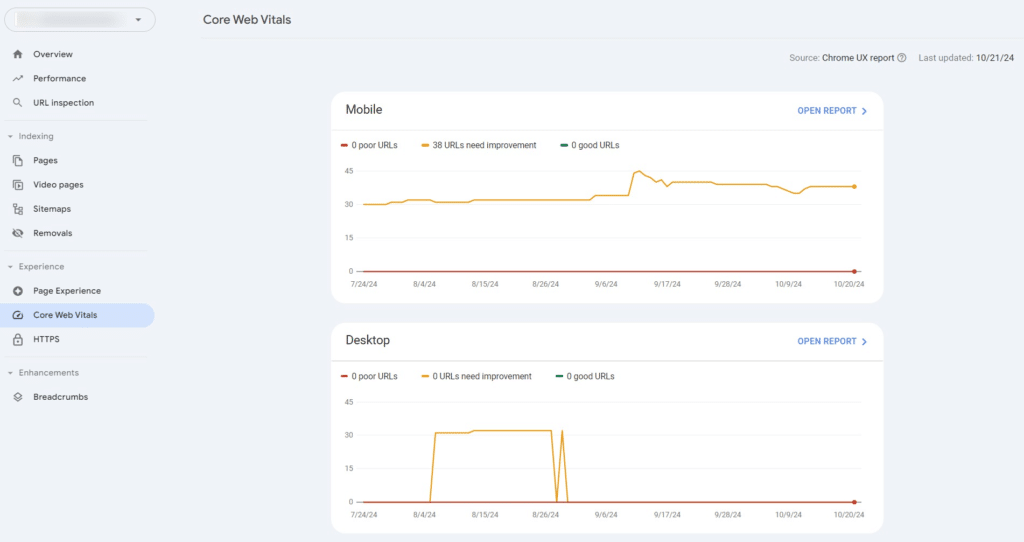
Start with the Core Web Vitals report in Google Search Console.
This report groups your URLs into three buckets:
- Good
- Needs Improvement
- Poor
Do not start by chasing every small issue. Start with the Poor URLs, especially on mobile. Then focus on the pages that matter most to your business.
For a prop firm, that usually means:
- Homepage
- Challenge pages
- Pricing pages
- Rules pages
- Checkout pages
- Login pages
- KYC pages
- Dashboard pages
- Payout pages
If those pages feel slow or unstable, traders notice. Worse, they start questioning whether the business itself is reliable.
Use PageSpeed Insights for page-level diagnosis
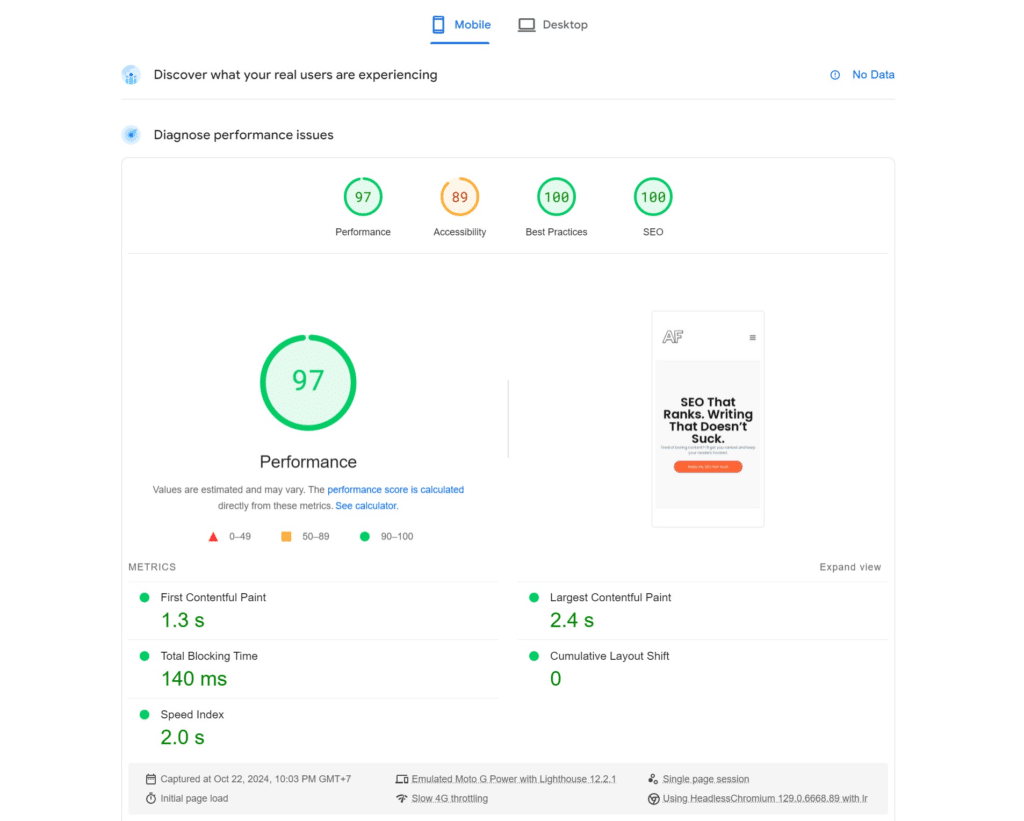
After you find problem URLs in Search Console, run those pages through PageSpeed Insights.
PageSpeed Insights shows you:
- LCP
- INP
- CLS
- Field data when available
- Lab data
- Specific performance opportunities
This is where you identify what is actually slowing the page down. It could be a hero image, a third-party widget, unused JavaScript, slow server response, or layout shifts from banners and embeds.
For prop firm sites, PageSpeed Insights is especially useful on challenge comparison pages and checkout pages because those pages often carry too much front-end weight.
Use Chrome UX Report for real-user data
Chrome UX Report, also called CrUX, shows how real Chrome users experience your site.
This matters because your own test result is not always the same as your users’ experience. A page may load fast on your laptop but perform poorly for traders on mobile data, older phones, or slower connections.
Use CrUX when you want to compare:
- Mobile vs desktop performance
- Month-over-month changes
- Origin-level performance
- Real-user Core Web Vitals trends
This is useful if you are tracking whether technical fixes actually improved performance after deployment.
Use Lighthouse for technical debugging
Lighthouse is useful, but do not treat its score as the final truth.
Use it to find technical issues like:
- Render-blocking resources
- Unused JavaScript
- Unused CSS
- Large network payloads
- Image optimization issues
- Accessibility and best-practice problems
Lighthouse is best for developers. It helps explain why a page performs badly, but Search Console and CrUX are better for judging real-world Core Web Vitals performance.
Use WebPageTest for deeper performance analysis
WebPageTest is useful when PageSpeed Insights does not give you enough detail.
Use it to inspect:
- Waterfall charts
- Server response timing
- Third-party script delays
- Image loading order
- CDN performance
- Mobile loading behavior
This is where you find the real bottlenecks. For example, you may discover that your review widget, chat tool, tracking script, or pricing table loads before the actual offer.
That is a problem. On prop firm pages, the offer should load first. Everything else should support the conversion, not block it.
Final thoughts
Core Web Vitals are still worth fixing in 2026, but the reason is simpler than most SEO posts make it sound. They help good pages stop underperforming.
For prop firms, they do something even more important. They make the site feel stable, credible, and usable when traders are evaluating your rules, buying a challenge, logging into a dashboard, or deciding whether they trust you with their details.
That is not just technical SEO. That is brand protection.
FAQs
Are Core Web Vitals still a ranking factor in 2026?
Yes. Google still says Core Web Vitals are used by its ranking systems, but they are only one signal among many. Strong relevance and useful content still matter more.
Is INP more important than FID now?
Yes. FID was replaced by INP as a Core Web Vital in March 2024, so any guide still centered on FID is outdated.
Should prop firms care about Core Web Vitals if they already rank?
Yes. Rankings are only half the job. Slow challenge pages, unstable pricing sections, and laggy dashboards can still crush conversion rate and trust.
What is a good Core Web Vitals score?
Good means LCP at 2.5 seconds or less, INP at 200 milliseconds or less, and CLS at 0.1 or less for the 75th percentile of visits.
Does a 100 Lighthouse score mean I pass Core Web Vitals?
No. Lighthouse is useful for debugging, but Core Web Vitals in Search Console are based on real-user field data from Chrome UX Report.
Which metric should most prop firms fix first?
Fix the metric marked Poor on your highest-value pages first. For many prop firms, that means LCP on landing pages and INP on checkout, dashboard, or form-heavy flows.
[ work with me ]
SEO Audit
A fixed scope audit that tells you whether your problem is technical, editorial, or strategic.